
QRコードリーダー EQS4.4.89 - Google Play
You'll be able to see results in few seconds.
Publisher Description



★ Total 10 million download breaks ★ “Lowest price search” “Web site automatic jump” “QR code creation” “Contact exchange” “Widget”
★ Total 10 million downloads exceeded! ★ "Lowest price search" "Vertical screen support" "Web site automatic jump" "QR code creation" "Contact exchange" "Application sharing" "Widget" ... is.
――――――――――――――――――――― ☆ ―― ★ ―― ☆ ――――――
* This app distributes deals such as recommended apps and coupons to the widget and status bar.
■ Lowest price search
By reading the bar code of a product, you can search the shop on the web where the product is sold at the cheapest and shop as it is!
■ Widget
If you install the “Recommended Apps” widget, when you install the app, it is automatically classified into a category and a shortcut is created on the home screen.
You can organize shortcuts of frequently used apps in the Favorites folder and check popular app rankings.
※※ How to install widget
Long press on the home screen ⇒ Select "Widgets" or "Add" ⇒ Select "Widgets" ⇒ Select "Recommended apps"
■ Nice vertical screen support!
■ Website automatic jump
After reading the QR code, you can automatically fly to the site or Google Play without displaying the URL.
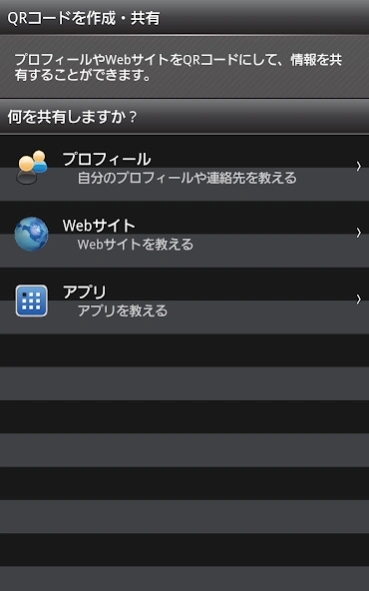
■ QR code creation and sharing
You can easily create a QR code from your profile, website, or apps you have installed and tell your friends easily.
■ The result of scanning the QR code can be copied or sent by e-mail.
・ Register the read address in the phone book
・ Reading sound ON / OFF setting
・ Vibration ON / OFF setting for reading
・ Search the search result word on the web
・ Record reading results in history
・ Clear history
・ Set not to record history
――― ☆ ― ★ ―――――――――――――――――― ☆ ★ ――――――
* QR code is a registered trademark of Denso Wave.
About QRコードリーダー EQS
The company that develops QRコードリーダー EQS is イクス株式会社. The latest version released by its developer is 4.4.89.
To install QRコードリーダー EQS on your Android device, just click the green Continue To App button above to start the installation process. The app is listed on our website since 2023-02-02 and was downloaded 0 times. We have already checked if the download link is safe, however for your own protection we recommend that you scan the downloaded app with your antivirus. Your antivirus may detect the QRコードリーダー EQS as malware if the download link to jp.eqs.apps is broken.
How to install QRコードリーダー EQS on your Android device:
- Click on the Continue To App button on our website. This will redirect you to Google Play.
- Once the QRコードリーダー EQS is shown in the Google Play listing of your Android device, you can start its download and installation. Tap on the Install button located below the search bar and to the right of the app icon.
- A pop-up window with the permissions required by QRコードリーダー EQS will be shown. Click on Accept to continue the process.
- QRコードリーダー EQS will be downloaded onto your device, displaying a progress. Once the download completes, the installation will start and you'll get a notification after the installation is finished.
Program Details
System requirements
Download information
Pricing
Version History
version 4.4.89
posted on 2023-02-02
・軽微な修正
Disclaimer
Official Google Play Link
We do not host the QRコードリーダー EQS app on our servers. We did not scan it for viruses, adware, spyware or other type of malware. This app is hosted by Google and passed their terms and conditions to be listed there. We recommend caution when installing it.
The Google Play link for QRコードリーダー EQS is provided to you by apps112.com without any warranties, representations or guarantees of any kind, so access it at your own risk.
If you have questions regarding this particular app contact the app developer directly. For questions about the functionalities of the apps112.com website, contact us.
